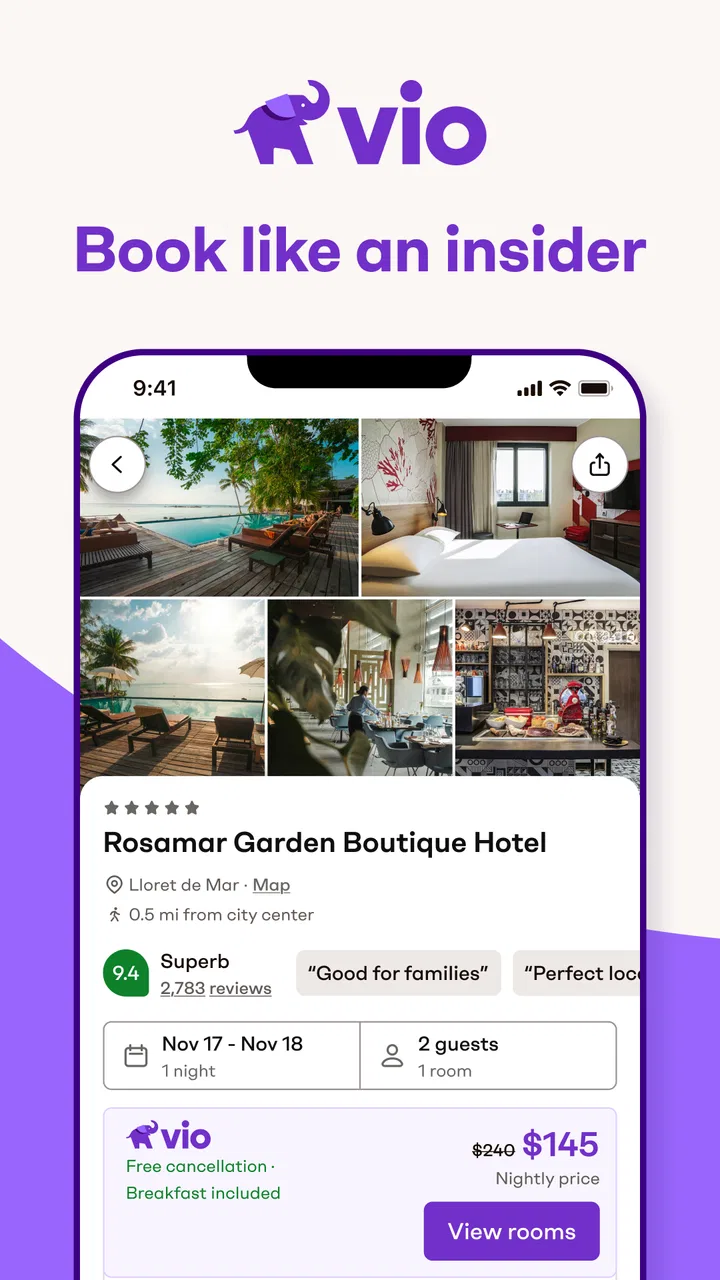
Vio: Hotels & travel deals
- 4.8
- Rating
- 1.00M
- Installs
- Free
- Price

 Analysis by App-foxy
When I look for a hotel on my phone, I want to understand the choice quickly without feeling pushed into a booking before I have checked the important details. Vio: Hotels & travel deals takes that travel-shopping problem as its starting point. It is a free Travel & Local app from Vio.com, and I found its main appeal in the way it brings hotel searching and deal comparison into a compact mobile experience.
My review focuses especially on how comfortably the app works for different people and situations. A travel app is not truly convenient if it is only easy to use in perfect conditions, with strong eyesight, steady hands, a quiet room and plenty of time. Vio can be useful for quick hotel research, but its value depends on how well its presentation fits the way you personally read, tap and compare information.
How the hotel search feels to read and navigate
The first thing I noticed is that the app’s purpose is easy to grasp. It is designed around finding accommodation and travel deals rather than trying to be a general-purpose trip planner. That focus helps when I already know the destination and dates I want to investigate. Instead of starting with a complicated travel dashboard, I can approach it as a focused hotel-shopping tool.
You May Also Like

 Blood Strike: 2.5 Anniversary
Blood Strike’s Loadouts Turn Every Drop Into a Tactical Gamble
A close look at Blood Strike’s custom loadouts: how fast access to signature weapons reshapes its battle royale rhythm, rewards preparation, and narrows the gap between fights.

 Pandora - Music & Podcasts
Pandora’s Music Is Easy to Start, but Harder to Recover
Pandora’s strength is its low-effort path from a seed to a station. Its weak spot is how much confidence it asks you to place in connection, setup, and quiet recovery.

 8 Ball Pool
 Is Built on Rivalries, Rematches, and Routine
A close look at the rivalries, rematches, shared routines, and unanswered safety questions that turn a quick pool match into a persistent mobile community.

 Samsung Music
’s Quiet Strength Is Playing What You Already Own
Its reach comes less from spectacle than from dependable access to a personal library. That simplicity is both the app’s strongest retention engine and its ceiling.

 AccuWeather: Weather Radar
AccuWeather Review: A Quick, Clear Forecast for Everyday Decisions
For everyday plans, the best forecast is the one you can understand quickly. AccuWeather makes rain timing, radar, and local conditions easy to act on, with a few trade-offs.

 Hill Climb Racing
Why Hill Climb Racing Still Turns Crashes Into One More Run
A tiny car, a bumpy hill and one more upgrade: Hill Climb Racing keeps resurfacing because its simple chaos makes every near-miss feel personal.
More From Our News Desk



For me, the most important readability test is not whether a screen looks attractive, but whether I can distinguish the useful information from the visual noise. Hotel searches naturally involve several competing details: property names, locations, room choices, prices, dates and booking conditions. A good mobile layout needs to let me scan first and inspect later. Vio works best when I use that two-stage approach rather than attempting to absorb every detail at once.
I would begin with a broad search, narrow the destination and travel dates, and then pause before choosing anything. This prevents the common mistake of treating the first appealing result as the best result. I also recommend opening the details of a promising hotel and checking the conditions carefully before comparing it with another option. The app is most useful as a comparison workspace, not as a one-tap impulse-buying tool.
The developer, Vio.com, presents the product as an insider-style way to book. In practical terms, I interpret that as an invitation to look beyond the obvious hotel choice and investigate deal differences. That can be helpful for travelers who are comfortable making their own comparisons. It is less comfortable for someone who wants a highly guided process with every decision explained in plain language.
Navigation also depends on how much information a user can comfortably track. Someone with reduced vision may need to enlarge text or use the operating system’s display tools, though the experience can become less convenient when larger text causes labels or controls to occupy more space. I would not assume that every important hotel condition becomes easier to see simply because the device’s text size is increased. Checking the screen after changing accessibility settings is worthwhile.
People who process information slowly may benefit from taking screenshots or writing down the key terms of two or three shortlisted hotels before moving between screens. That sounds basic, but it is particularly useful in travel shopping, where a deal can look attractive until cancellation, room type or location changes the real value. Vio gives me a practical starting point, but I still have to organize the comparison myself.
Useful habits for clearer comparisons
My preferred workflow is to decide the non-negotiables before opening the results. I might choose a maximum travel distance from the destination area, a room requirement and a cancellation preference. Then I use the app to search for candidates instead of letting the most visually prominent result define my priorities.
A second helpful habit is to read the hotel information in two passes. On the first pass, I look only at location and overall suitability. On the second, I inspect the booking conditions and final details. This reduces cognitive overload and makes it less likely that I will confuse a low headline price with a genuinely suitable reservation.
A third is to avoid comparing hotels while tired or distracted. If I am sitting in an airport with announcements around me, I am more likely to miss a small piece of information or tap the wrong option. I would shortlist options when I have time, then make the final decision in a calmer setting. That is not a flaw unique to Vio, but a focused mobile deal app can encourage fast decisions if I am not deliberate.
Touch, vision and sensory considerations
Hotel booking involves repeated tapping, scrolling and returning to earlier information. That makes motor comfort important. Travelers with limited dexterity may find this type of task tiring, especially when they need to adjust dates, revisit a result and then inspect its conditions. I would approach the app in short sessions rather than trying to complete a complicated search while holding luggage or walking through a station.
Using a larger device or placing the phone on a stable surface can make the process easier. Voice control supplied by the phone’s operating system may also help with general navigation, but I would not treat that as proof that every part of the app is fully operable by voice. The practical question is whether the controls and hotel details remain understandable when a user relies less on precise tapping.
For users with tremors or other motor difficulties, accidental taps are a real concern in any booking flow. I recommend slowing down at the point where a hotel or deal is selected and checking the destination, dates and room information again before proceeding. The app is a poor place to rely on a quick swipe or a tap made while multitasking. A stable surface and a deliberate review step make the experience safer.
People with visual sensitivities may prefer a dimmer screen, a calmer environment or a device setting that reduces glare. Hotel results can contain several visual elements competing for attention, so I find it easier to focus when I search with notifications silenced. This is also helpful for users who are sensitive to interruptions or who need more time to interpret changing screens.
Users who are color-blind should avoid relying on color alone when judging whether a deal is suitable. I would read the written price and conditions rather than assuming that a color treatment communicates the complete meaning. Likewise, travelers with hearing loss should not depend on sound cues for important information; written details are the part I would verify before making a decision.
Older travelers may appreciate the app’s focused purpose, but they may also need more time to distinguish hotel names from booking conditions. I would recommend showing the app to a family member before a trip, not to take over the decision, but to agree on a simple routine: search, shortlist, open the details, review the conditions and only then book. That routine can reduce pressure when the traveler is using a small screen or unfamiliar interface.
Different abilities need different workflows
There is no single “accessible user” profile. A person with limited hand movement may need fewer taps; a person with dyslexia may need extra time and a less crowded reading process; a person with low vision may depend on magnification; and a person with attention difficulties may benefit from recording the important terms outside the app. Vio can fit these workflows as a research tool, but I would not assume that one setting solves all of them.
My strongest recommendation is to separate research from commitment. First identify suitable hotels and save the relevant information in a way that works for you. Then return when you can verify the booking details calmly. This is especially valuable for users who find rapid screen changes, dense information or time pressure difficult.
Using Vio in real travel situations
The app makes the most sense in everyday situations where I need to compare accommodation without opening a full desktop browser. Imagine I am planning a weekend visit and discover that the first hotel I considered is too expensive. I can use Vio to search the same destination, inspect alternatives and decide whether a different property gives me a better balance of location and cost.
Another realistic use is a last-minute work trip. I may already know the area but need to check several hotels quickly. In that case, the focused travel category is an advantage: I am not asking the app to manage every part of my itinerary. I am using it for one job, then checking the final terms before committing.
It can also help a group with different priorities. One traveler may care about price, another about location and another about the room arrangement. I would let each person review the shortlist in turn, because passing one phone around while everyone speaks at once is likely to create confusion. A written shortlist makes the discussion more inclusive than asking everyone to remember what they saw on a rapidly changing screen.
For travelers with limited connectivity or a low battery, I would plan ahead rather than assuming the app will replace all offline travel preparation. Before leaving a reliable connection, I would record the hotel name, address and booking information in a format I can access easily. A hotel-search app is useful during planning, but a traveler should not depend on live searching at the exact moment directions or confirmation details are needed.
When traveling internationally, I would be particularly careful with language, currency presentation and local conventions. Even if the search itself feels simple, unfamiliar terms can make room conditions harder to interpret. I would slow down, check what I am actually booking and use a translation or accessibility tool on the phone if needed. Vio can support the search, but it cannot remove the need for careful reading across languages and travel systems.
Where it differs from usual hotel-booking alternatives
The usual alternative is a large general travel platform that combines hotels with flights, car hire, maps, loyalty programs and other trip tools. Those services can be better when I want one account to manage a complete itinerary or when I already rely on a familiar rewards system. Their weakness is that the extra sections can make a simple hotel search feel crowded.
Vio’s narrower identity is appealing when I want to focus on accommodation deals. I do not need a broad travel dashboard to begin comparing hotels. That can reduce distraction, particularly for someone who finds multi-purpose apps difficult to navigate. On the other hand, users who need extensive destination planning may eventually have to switch to another service, a map app or a direct hotel website.
Booking directly with a hotel is another important comparison. A hotel’s own website may provide the clearest property-specific information and can feel more straightforward when I already know where I want to stay. Vio is more useful earlier in the process, when I am still comparing possibilities. If I have a strong preference for one hotel or need to discuss a special request, I would inspect the direct booking route as well rather than treating a deal comparison app as the only option.
Price comparison is not the same as value comparison. A lower-looking offer may not suit me if it comes with a less flexible condition, an inconvenient location or a room arrangement that does not work for my group. Vio helps me discover options, but my final choice should be based on the complete booking information. This is where a careful reader has an advantage over someone who only scans the most prominent deal.
Remaining barriers and who should think twice
The main limitation I felt is that convenience does not remove decision fatigue. Comparing hotels still requires attention, memory and patience. If I want the app to tell me exactly which hotel is best for my personal needs, I may find the experience incomplete. It supports discovery, but it does not replace judgment.
I would also hesitate to recommend it as the only tool for travelers who need highly specific accommodation details before booking. Anyone with mobility, medical, sensory or family requirements should verify the relevant property information directly and ask the hotel questions when necessary. A general deal result should not be treated as a guarantee that a property will meet an individual access need.
Users who dislike comparing prices, conditions and locations may prefer a familiar hotel provider with a more guided reservation process. Likewise, travelers who already have a trusted loyalty program may gain more from staying inside that system. Vio is a better fit for independent comparison than for people who want every decision tied to an existing travel account.
There is also a situational barrier for people who need to complete a booking under pressure. A noisy terminal, poor lighting, weak connectivity, low battery or physical discomfort can turn a simple search into a stressful task. I would prepare the shortlist earlier whenever possible. The app is most inclusive when it is used as part of a calm workflow, not as an emergency substitute for preparation.
Its age rating is Everyone, which makes the product broadly approachable from a content perspective. That does not mean every traveler will find the interface equally comfortable, however. Age, vision, dexterity, reading ability and familiarity with online bookings all affect the experience. I think that distinction matters: broad suitability is not the same as effortless access for every person.
My inclusive verdict after using it
Vio: Hotels & travel deals is a useful free option for travelers who want a focused way to investigate hotel offers. Its strongest quality is the clear travel purpose: I can use it as a starting point for accommodation research without committing to a large all-in-one travel ecosystem. The developer is Vio.com, and the app has built a visible audience, with a 4.7 average from around 13 thousand ratings and over 1 million installs.
The current version is 2.19.0, and it runs on Android 7.0 or later. Those details make it relevant to people using older Android phones, although the practical comfort of the experience will still depend on the device’s screen, performance and accessibility settings. It is free to install, and the Everyone content rating makes it easy to consider for individual travelers and families.
My recommendation comes with a condition: use it deliberately. Set your priorities before searching, compare complete hotel details rather than headline deals, and give yourself time to review the final choice. If you have access requirements, treat the app as a discovery tool and confirm the property’s suitability through reliable property-specific information.
For a traveler who enjoys comparing options and wants a compact hotel-search companion, I would recommend giving it a try. For someone who needs a fully guided itinerary manager, direct support for complex accommodation requirements or a loyalty-centered booking experience, another travel service may be a better fit. Vio is most inclusive when it supports your decision-making without rushing it.
FAQs for Vio: Hotels & travel deals
01What is Vio: Hotels & Travel Deals?
Vio: Hotels & Travel Deals is a mobile application designed to help users find the best deals on hotels and travel packages. It aggregates offers from various online travel agencies, providing a comprehensive comparison to ensure users can book accommodations at the best possible price.
02How does Vio ensure the best travel deals?
Vio uses advanced algorithms to scan multiple travel platforms and compare prices in real-time. This ensures users receive up-to-date, competitive rates on hotels and travel packages. Additionally, users can set alerts for price drops and special promotions to maximize savings.
03Is Vio: Hotels & Travel Deals free to use?
Yes, Vio is free to download and use on both Android and iOS platforms. While the app itself does not charge fees, be aware that booking through third-party services may incur additional charges or fees, depending on the provider's terms.
04Can I book flights through Vio?
Currently, Vio focuses primarily on hotel bookings and travel package deals. While it provides comprehensive hotel options, it does not offer direct flight bookings. Users seeking flight arrangements will need to use other platforms specifically for that purpose.
05How reliable are the reviews and ratings on Vio?
Vio incorporates verified user reviews and ratings from various travel platforms to ensure authenticity and reliability. This helps users make informed decisions based on genuine feedback, enhancing their travel planning experience with trustworthy insights.
Pros
- User-friendly interface for easy navigation.
- Exclusive travel deals updated regularly.
- Secure payment options enhance trust.
- Wide range of hotels and destinations.
- 24/7 customer support for assistance.
Cons
- Occasional app crashes disrupt booking.
- Limited language options for global users.
- Inconsistent notification updates.
- Frequent login prompts can be annoying.
- Limited offline functionality.

Vio: Hotels & travel deals
Gallery